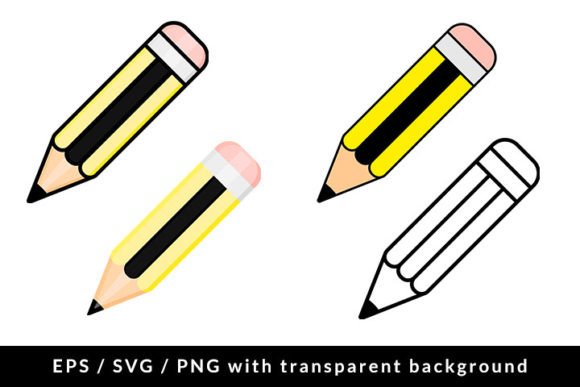
School Pencil with Eraser Icon Set
Icons are no longer just decorative flourishes—they’re functional tools that shape how users navigate, understand, and trust digital experiences. The School Pencil with Eraser Icon Set reflects this shift: four precisely crafted, flat vector illustrations designed not for nostalgia alone, but for real-world utility across modern platforms, branding systems, and educational interfaces. Each icon in the set features a clean, recognizable pencil with an integrated eraser—balanced in proportion, consistent in stroke weight, and optimized for clarity at any scale.
Why This Icon Set Fits Today’s Creative and Professional Needs
Designers, educators, and product teams increasingly prioritize assets that work seamlessly across contexts—whether embedded in a learning management system, layered into a slide deck, or scaled down for a mobile app toolbar. The School Pencil with Eraser Icon Set meets that need with technical precision: it includes 4 EPS vector files for full editability in Adobe Illustrator, 4 SVG vector files for responsive web use (with crisp rendering on high-DPI screens), and 4 PNG files—each at 5000 × 5000 px resolution and 300 DPI—ideal for print-ready materials like posters, handouts, or branded stationery.
This isn’t just about file variety—it’s about workflow alignment. A freelance instructional designer building an online course can drop the SVG directly into their LMS without resizing or quality loss. A small business owner launching a back-to-school workshop series can use the high-res PNGs in social media ads and printed flyers, confident the eraser detail remains legible even when zoomed in on a smartphone screen. The transparent background ensures effortless layering over gradients, photos, or brand colors—no extra masking or cleanup required.
From Classroom Symbol to Cross-Platform Signal
The pencil with eraser has long carried symbolic weight: revision, learning through trial, thoughtful correction, and iterative growth. But its visual language has evolved. Older icon sets often leaned into realism—shaded wood grain, metallic ferrules, or exaggerated erasers—making them difficult to scale or adapt. Today’s expectations favor flat, minimalist design: geometric consistency, intentional negative space, and universal readability. This set embraces that evolution without sacrificing warmth or recognizability.
You’ll notice subtle but meaningful choices—like the gentle taper of the pencil tip, the soft curve where the eraser meets the barrel, and the balanced weight distribution across all four variations (e.g., angled left/right, upright, and slightly rotated). These aren’t arbitrary; they reflect how users scan icons in context. A left-tilted pencil reads as “active input” in UI patterns, while an upright version anchors a section header in an academic brochure. That level of intentionality separates usable assets from generic clip art.
How Educators, Marketers, and Creators Are Using These Icons Right Now
In education technology, icons serve dual roles: functional navigation aids and emotional cues. A student seeing a pencil-with-eraser icon next to a “Revise Essay” button feels invited—not intimidated—to make changes. Teachers using digital rubrics or feedback tools report higher engagement when interface elements visually reinforce the pedagogical value of reflection and revision. This set supports that psychology through clarity and consistency.
Marketers targeting back-to-school seasons are also shifting strategy. Rather than relying solely on seasonal imagery (e.g., backpacks or apples), many now build cohesive visual systems around core academic actions—writing, reviewing, editing, and submitting. The School Pencil with Eraser Icon Set fits naturally into that framework. One education SaaS company recently used all four icons to differentiate stages in their “Assignment Workflow” dashboard: draft, peer review, instructor feedback, and final submission—each step anchored by a distinct, yet harmonized, pencil variation.
Freelancers and small studios appreciate the time saved when assets arrive production-ready. No need to trace, re-vectorize, or adjust contrast for dark-mode compatibility—the SVGs export cleanly with accessible color contrast, and the EPS files retain editable layers for custom color overrides. That reliability matters when you’re iterating on client deliverables under deadline.
Technical Flexibility Meets Real-World Constraints
It’s easy to overlook how file format limitations impact actual usage. Raster-only sets fail at scale; SVG-only sets sometimes break in legacy email clients or older CMS templates; EPS files without outlined strokes can misrender across versions of design software. This ZIP package avoids those pitfalls deliberately.
- EPS files include outlined paths and embedded fonts (where applicable), ensuring fidelity in print workflows and professional prepress environments.
- SVG files are hand-optimized—minified, with accessible title tags and semantic IDs—so they integrate smoothly with React components or WordPress block editors.
- PNGs are true 300 DPI at full size, meaning they hold up in large-format printing (e.g., classroom banners or conference signage) without pixelation or interpolation artifacts.
That level of technical foresight means less troubleshooting and more doing—whether you’re updating a school district’s internal training portal or designing a bilingual homework app for elementary students.
Design Integrity Without Compromise
Some icon sets sacrifice personality for scalability—resulting in stiff, lifeless shapes. Others lean too far into stylization, losing instant recognition. This set walks the line thoughtfully. The eraser isn’t oversized or cartoonish; it’s proportional and grounded. The graphite tip isn’t overly sharp or blunt—it suggests readiness, not rigidity. Even the subtle texture implied by the flat vector style adds tactility without clutter.
That balance makes the icons adaptable across tone and audience. They feel appropriate in a progressive Montessori school’s website—where learning is self-directed and process-oriented—as well as in a corporate upskilling platform emphasizing “draft, refine, apply.” No rebranding needed. Just thoughtful integration.
Practical Next Steps for Users
If you're evaluating whether this icon set aligns with your current or upcoming projects, consider these realistic starting points:
- Educational content creators: Use the upright pencil icon as a recurring visual anchor in video thumbnails or blog post headers tagged “Writing Tips” or “Study Strategies.” Its familiarity lowers cognitive load instantly.
- UI/UX designers: Test the rotated variants in wireframes for annotation tools or collaborative whiteboards—especially where users need clear visual cues for “edit mode” versus “view mode.”
- Small business owners: Apply the PNGs to Canva templates for printable checklists (“Back-to-School Supply Tracker”) or editable PDF planners—leveraging the transparency to overlay cleanly on patterned backgrounds.
- Bloggers and newsletter writers: Insert the SVG inline in HTML emails to highlight “revision-friendly” resources (e.g., editable worksheets or customizable lesson plans) without triggering image-blocking filters.
What makes the School Pencil with Eraser Icon Set valuable isn’t just what it contains—but how little friction it introduces. In a landscape where attention spans are short and delivery timelines are tight, having four purpose-built, technically sound, and stylistically unified icons saves hours—not just in asset sourcing, but in decision fatigue, revision rounds, and cross-platform testing.
Back-to-school season may be cyclical, but the need for clear, trustworthy, and adaptable visual language is constant. These icons don’t shout. They support. They clarify. And they do it consistently—across devices, audiences, and use cases.