Colorful Globe Vector Illustration: A Versatile Design Asset for Educators, Designers & Marketers
Whether you're designing a back-to-school presentation, launching an eco-conscious brand campaign, or building a global education website, a Colorful Globe Vector Illustration adds instant visual clarity and emotional resonance. Unlike generic stock photos or pixelated PNGs, this particular globe asset combines vibrant aesthetics with technical precision—making it as functional in the classroom as it is in the creative studio.
What Makes This Colorful Globe Vector Illustration Stand Out?
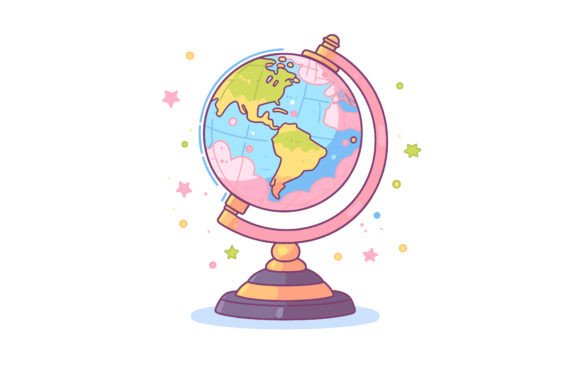
This isn’t just another Earth graphic—it’s a purpose-built design resource engineered for real-world use. The Colorful Globe vector illustration delivers both artistic appeal and production-ready flexibility. Its flat-style Earth rendering avoids photorealistic clutter, focusing instead on clean lines, balanced color zones, and intuitive geographic recognition. Think of it as a friendly, modern Earth—not a textbook diagram, not a satellite image—but something that invites engagement.
The package includes two essential file formats: a high-resolution JPEG file (4000×2584 px) for immediate use in presentations, social posts, or printed handouts—and a fully editable EPS vector file. That EPS format is where the real power lies. Because it’s vector-based, you can scale it to billboard size without a single pixel blurring. Zoom in 500%? Still razor-sharp. Shrink it to fit a mobile app icon? No loss of fidelity.
Why 100 Vector Shapes Matter More Than You Think
At first glance, “100 vector shapes” might sound like a technical footnote. In practice, it’s a game-changer. Each continent, ocean boundary, latitude line, and even subtle gradient layer is built as an individual, named, and grouped vector object. That means:
- You can quickly recolor South America to match your brand palette—without affecting Asia or the Pacific.
- Need to highlight climate zones? Toggle visibility of specific shape layers or apply transparency effects selectively.
- Want to animate the globe in After Effects or Figma? Export individual continents as SVG layers for smooth motion sequences.
- Teaching geography? Isolate Africa and add custom labels—or remove political borders entirely to focus on physical features.
This level of modularity transforms the Colorful Globe vector illustration from static decoration into an interactive teaching or design tool. It’s not just “an image you drop in”—it’s a canvas you build upon.
Back to School Globe Vector: More Than Just a Seasonal Trend
Every August, educators scramble for fresh, inclusive visuals that reflect our interconnected world. A Back to school Globe vector meets that need with intention. Its cheerful color scheme—warm oranges for landmasses, soft ceruleans for oceans, and gentle gradients for atmospheric depth—feels welcoming rather than clinical. Students respond better to visuals that feel human, not sterile.
Consider these everyday classroom applications:
- Interactive Maps: Import the EPS into Google Slides or PowerPoint, ungroup elements, and turn continents into clickable navigation buttons linking to country profiles.
- Digital Portfolios: Students insert their own illustrations or photos into continent-shaped masks—creating personalized “My World” projects.
- Lesson Handouts: Print the JPEG at full size for wall displays, then use the vector file to generate smaller versions for student worksheets—each scaled perfectly for readability.
Unlike clipart from the early 2000s, this Colorful Globe vector illustration respects cultural nuance. Coastlines are accurate but simplified; no disputed borders are emphasized; ocean regions flow naturally—making it appropriate for international classrooms and diverse curricula.
How Designers and Marketers Use This Asset Strategically
Creative professionals don’t just grab assets—they solve problems. Here’s how the Colorful Globe vector illustration solves several common ones:
Brand Consistency Across Touchpoints
A sustainable fashion startup uses the globe to visualize its supply chain—from organic cotton farms in India to ethical manufacturing in Portugal. By recoloring only three continents to match their brand’s teal-and-cream palette, they maintain visual cohesion across Instagram carousels, email headers, and packaging inserts—all from one source file.
Rapid Prototyping for Web & App UI
UX designers embed the vector globe into Figma as a reusable component. When stakeholders request “a more global feel” for a dashboard, swapping in this illustration takes under two minutes—and because it’s vector, it auto-scales across device frames without manual resizing.
Print-Ready Flexibility
A nonprofit producing bilingual climate reports needs crisp, CMYK-friendly assets. The EPS file imports cleanly into Adobe InDesign, retains spot-color support, and exports flawlessly to PDF/X-4—no rasterization, no font embedding issues, no last-minute panic before press time.
Practical Tips for Getting Started
The files arrive compressed in a single ZIP folder—a standard, lightweight package compatible with all major operating systems. To access them:
- Extract with ease: On Windows, simply double-click the ZIP file and click “Extract All.” On macOS, double-clicking opens it automatically in Archive Utility. No need for WinRAR or WinZIP unless you prefer them.
- Open the EPS in compatible software: Adobe Illustrator is ideal, but Affinity Designer, CorelDRAW, and even recent versions of Inkscape handle EPS files reliably. If you’re using Canva or Figma, import the JPEG first, then trace or replace elements using the vector layers as reference.
- Check layer organization: Before editing, expand the Layers panel. You’ll find logical groupings—“Continents,” “Ocean Fill,” “Grid Lines,” “Labels (Optional).” Mute or lock layers you’re not adjusting to avoid accidental changes.
- Save smartly: Always keep your original EPS untouched. Save edited versions as AI, SVG, or PDF—depending on your output needs. For web use, export SVGs with “Responsive” enabled for fluid scaling.
Who Benefits Most From This Resource?
While anyone can use a globe graphic, this Colorful Globe vector illustration shines brightest for users who value both creativity and control:
- Teachers and curriculum designers who want visuals that grow with lesson complexity—from basic continent identification to climate migration patterns.
- Freelance designers juggling tight deadlines across branding, web, and print—where reusability cuts revision time by 60% or more.
- Marketing teams building global campaigns but lacking in-house illustration talent—this asset bridges the gap between stock imagery and custom art.
- Nonprofits and NGOs communicating cross-border impact without relying on outdated or politically charged maps.
It’s also ideal for students learning vector fundamentals—its clean structure serves as an excellent case study in grouping, layering, and non-destructive editing.
Final Thought: Quality Isn’t Just About Looks—It’s About Workflow
A great Colorful Globe vector illustration doesn’t just look good—it saves time, reduces friction, and adapts without compromise. With its 4000×2584 px JPEG for quick deployment and fully layered EPS for deep customization, this asset respects how people actually work today: across devices, tools, and teams. Whether you're mapping literacy rates, illustrating a carbon footprint calculator, or simply making your “Welcome Back” slide feel more inclusive—the right globe graphic does quiet, consistent work behind the scenes. And when that globe is colorful, scalable, and thoughtfully built? It stops being background decoration—and starts becoming part of your message.